The brain of my Protogen fursuit, featuring GLSL shaders on dual round displays, LED matrix visor control, AirPlay/Spotify streaming, Doom, Super Haxagon, Bluetooth gamepads and speakers, and way more than I originally planned.
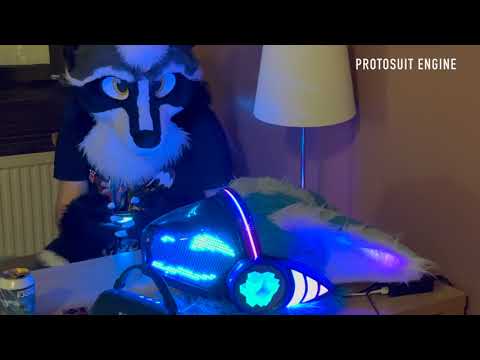
My friend Miggy and I make our Protogen fursuits together, he handles 3D CAD and I handle the electronics and software. My original suit (v1) from 2023 ran a fork of b0xcat/protocontrol (my fork) with 14 basic MAX7219 matrices and no sensors. I wore it at NFC and FBL 2024. It worked, but I wanted more.
In 2023, we found some 5-inch 1080x1080 round displays on AliExpress. Miggy designed and almost finished building a suit around them, looking back they were pretty bulky and heavy. Then in 2024 we found 4-inch 720x720 displays and that's when I jumped on board to use them for my v2 suit and his too. The project was reborn.
Miggy did all the 3D modeling to fit the displays on b0xcat's Protato base, paired with Coela Can't!'s WS35 LED matrices and b0xcat adapters. In 2024 the plan was a RockPro64 with two Raspberry Pi Zero 2Ws in USB gadget mode as display drivers. Early 2025 we switched to an RPi 5 with the two Zeros, then in October 2025 I ditched the Zeros entirely and used the Pi 5's dual HDMI output directly, that's when I really restarted the project and wrote the current codebase. I started adapting Shadertoy shaders to run on it, and features just kept getting added from there.
If you're building a Protogen and want animated fin displays, feel free to adapt this for your own build!
- Miggy: for all the 3D CAD, creating some shaders for the project, building our v1 and v2 suits together, hyping me up on everything, pitching great ideas like the now playing with lyrics, and for letting me stay at his place for weeks when we need to work on stuff
- Kuroda: for helping with my v1 fursuit, and for building the original b0xcat-based suits with Miggy before I joined in, and for being so welcoming and a big reason I joined the fandom in the first place
- b0xcat: for the original Protato CAD design that this project builds on, and the PETG thermoformed visor my suit is still using after all these years, I wish him the best
- Coela Can't!: for the WS35 LED matrices, the b0xcat adapter, and ProtoTracer
- Dharsi: for creating the original ESP32 LED circle timing game with Miggy that became Ring Ding
- Azavech: for designing the score system for Ring Ding
- Respective Shadertoy authors: most shaders are adapted from Shadertoy, heavily modified for OpenGL ES and uniforms control, original credits are in each
.glslfile
- Flash Raspberry Pi OS Lite (64-bit) on a microSD card with username
proto - Boot the Pi and run:
sudo apt update
sudo apt upgrade -y
sudo apt dist-upgrade
sudo apt install git ansible -y
sudo reboot- Wait until the Pi reboots, and run:
git clone --recurse-submodules https://github.com/lululombard/protosuit-engine.git
cd protosuit-engine
ansible/scripts/deploy.sh
That's it! The system will auto-configure and start on boot.
- Raspberry Pi 5 (4GB+ RAM)
- Two 4-inch 720x720 round displays with HDMI-MIPI driver boards, mounted on fursuit fins
- Custom PCB (hardware/pcbs/ProtosuitDevBoard/): KiCad power distribution board with 9-25V input, dual buck converters, LED matrix/strip connectors
- USB Wi-Fi 6 + Bluetooth dongle (RTL8851BU): handles Wi-Fi client + BT devices; built-in RPi Wi-Fi runs AP mode
- USB microphone dongle: for sound-reactive shader audio capture (FFT)
See hardware/README.md for PCB details, USB connections, GPIO pinout, display configuration, and Bluetooth adapter management.
- GLSL Shader Animations: Over 30 shaders with smooth cross-fade transitions, blur effects, and real-time parameter control
- Media Playback: Videos (exclusive), audio (stackable), synchronized playback
- Executables: Run shell scripts (Doom, Super Haxagon, Ring Ding) across both displays
- Bluetooth Device Management: Discover, pair, and connect devices via D-Bus (BlueZ API)
- Presets: Save and restore complete visor states (shader + uniforms + Teensy params) with a default preset that auto-restores after media playback, gamepad combo activation, and web UI management
- Gamepad Input: Assign controllers to displays with evdev-based input reading and MQTT forwarding
- Audio Device Control: Manage output devices and volume via pulsectl (PulseAudio), with auto-reconnect
- AirPlay & Spotify Connect: Stream audio with now-playing metadata and cover art
- Synced Lyrics: Real-time synchronized lyrics from lrclib.net for AirPlay and Spotify
- Wi-Fi Management: Dual-mode networking with AP hotspot (systemd-managed hostapd/dnsmasq), client mode via NetworkManager D-Bus, automatic NAT routing, and QR code sharing
- ESP32 Visor: OLED status dashboard (Pi metrics, FPS, Teensy state, DHT22 sensors), auto fan curves, notification overlay
- Teensy LED Visor: ProtoTracer 3D LED rendering with face animations, audio visualization, and effects
- Web Control Interface: Browser-based control with live preview, physics-based sliders, and performance monitoring
- PSP Remote Controller: PSP homebrew app as wireless gamepad over MQTT
- Custom PCB: KiCad-designed power distribution board with LED matrix/strip connectors
Open your browser to http://<raspberry-pi-ip>
| Page | URL | Description |
|---|---|---|
| Dashboard | / |
Shader selector, parameter sliders, live preview, FPS monitor, visor status |
| Virtual Controller | /controller |
Mobile-friendly gamepad UI for testing inputs |
| Bluetooth & Audio | /bluetooth |
Device scanning, pairing, controller assignment, audio device selection |
| Cast Settings | /cast |
AirPlay/Spotify enable/config, now-playing with cover art, synced lyrics |
| Networking | /networking |
Wi-Fi client/AP config, QR code sharing, service health |
The dashboard includes a visor panel with fan curve editor and Teensy LED menu controls (face, brightness, color, effects).
Ten independent Python services communicating via MQTT, plus shared utilities for logging, D-Bus, and systemd control. See engine/README.md for the full services table, shared modules, configuration reference, and complete MQTT API.
- MQTT: All inter-service messaging under
protogen/fins/*andprotogen/visor/* - D-Bus: BlueZ (Bluetooth), systemd (service control), PulseAudio (audio sinks)
- Serial: ESP32 ↔ Pi (tab-separated with CRC-8 checksum, 921,600 baud), ESP32 ↔ Teensy (text commands)
Supporting services: xserver (X11), mosquitto (MQTT broker), pulseaudio (audio server)
protosuit-engine/
├── engine/                  # Python services + shared modules (see engine/README.md)
│   ├── audiobridge/         #   Audio device/volume management
│   ├── bluetoothbridge/     #   Bluetooth discovery/pairing
│   ├── castbridge/          #   AirPlay, Spotify Connect, lyrics
│   ├── config/              #   Config loader module
│   ├── controllerbridge/    #   Gamepad input forwarding
│   ├── data/                #   OUI MAC address lookup table
│   ├── espbridge/           #   ESP32 serial bridge
│   ├── launcher/            #   Media/executable launcher
│   ├── networkingbridge/    #   Wi-Fi client/AP management
│   ├── renderer/            #   OpenGL shader renderer
│   ├── utils/               #   Shared modules (MQTT, logger, D-Bus, etc.)
│   └── web/                 #   Flask web interface + static assets
├── firmware/                # Embedded firmware (see firmware/README.md)
│   ├── esp32/               #   ESP32 firmware (PlatformIO C++)
│   ├── prototracer/         #   Teensy LED visor firmware (git submodule)
│   └── psp-controller/      #   PSP homebrew MQTT controller (C/PSP SDK)
├── hardware/                # PCB and hardware designs (see hardware/README.md)
│   └── pcbs/
│       └── ProtosuitDevBoard/  # KiCad PCB design
├── ansible/                 # Ansible deployment playbooks and templates
├── assets/                  # Shaders (.glsl), audio, video, apps, executables (.sh)
├── scripts/                 # Utility scripts
├── tests/                   # Integration tests
├── config.yaml              # Main configuration file
├── protosuit_engine.py      # Development launcher (all services in one process)
└── requirements.txt         # Python dependencies
- ESP32: PlatformIO C++ firmware for visor sensors, fan control, OLED display, and MQTT/Teensy serial bridge
- ProtoTracer / Teensy 4.0: real-time 3D LED rendering engine (git submodule, fork of coelacant1/ProtoTracer)
- PSP Controller: PSP homebrew app as wireless MQTT gamepad
./firmware/esp32/build_and_upload.sh          # ESP32: build, upload, restart espbridge
./firmware/prototracer/build_and_upload.sh    # Teensy: build, upload via loader GUI
See firmware/README.md for modules, serial protocol, fan curves, Teensy menu parameters, and build details.
# Check status
sudo systemctl status protosuit-renderer
sudo systemctl status protosuit-launcher
sudo systemctl status protosuit-web
sudo systemctl status protosuit-bluetoothbridge
sudo systemctl status protosuit-audiobridge
sudo systemctl status protosuit-controllerbridge
sudo systemctl status protosuit-castbridge
sudo systemctl status protosuit-networkingbridge
sudo systemctl status protosuit-espbridge

# View logs
sudo journalctl -u protosuit-renderer -f

# Restart a service
sudo systemctl restart protosuit-rendererCreate GLSL shaders in assets/shaders/:
#version 300 es
precision highp float;

uniform float iTime;
uniform vec2 iResolution;
uniform float speed;        // MQTT-controllable
uniform vec3 color1;        // MQTT-controllable

in vec2 v_fragCoord;
out vec4 fragColor;

void main() {
    vec2 uv = v_fragCoord / iResolution;
    vec3 col = color1 * sin(uv.x * 10.0 + iTime * speed);
    fragColor = vec4(col, 1.0);
}
Add to config.yaml and control via MQTT. See engine/README.md for examples.
./tests/test_mqtt_inputs.sh # Tests Doom, Super Haxagon, Ring Ding inputscd ~/protosuit-engine
source env/bin/activate
python protosuit_engine.py # All services in one process (dev only)For production, use systemd services (see Service Management).
sudo systemctl status xserver
sudo systemctl status protosuit-renderer
DISPLAY=:0 xrandr --querysudo systemctl status mosquitto
mosquitto_sub -t "protogen/#" -v # Monitor all topicssudo journalctl -u protosuit-espbridge -f
ls -la /dev/ttyUSB0 # Check serial device existslsusb | grep Teensy # Only visible in bootloader mode
killall teensy # Kill stuck uploader UI
./firmware/prototracer/build_and_upload.sh # RetryFor more help, open an issue on GitHub.
New PCB integrating all components:
- SMD power circuitry instead of off-the-shelf buck converter modules
- ESP32 module directly on-board instead of a dev board
- Raspberry Pi Compute Module mounted in the visor (fan-cooled area) instead of a full RPi 5 in the fin (soft temp limit currently set to 60°C to avoid PETG warping due to no airflow)
- Custom display driver circuitry instead of separate HDMI-MIPI boards
- Custom LED matrix PCB for fins instead of many cut/soldered LED strips
- PS Vita Control: Migrate from PSP to PS Vita. WPA1 support required by PSP is too much of a hassle. Be able to switch presets, control launcher, etc.
- Shader image/video support: load images and videos as shader inputs (textures)
- Single web page: Ditch the separate controller/bluetooth/networking/cast and integrate it on the single web page with modals
- Web UI refactor: Terminal style, desktop with folders (presets, shaders, visor), needs to be phone compatible
- Use same uniform names: Ability to sync HueF/HueB for color1/color2 when available, same speed names, etc...
This project is licensed under the GNU Affero General Public License v3.0 (AGPL-3.0), matching the ProtoTracer license.